 logo

You can implement WebP images in your Magento 2 store to boost your website’s performance and reduce image size without quality degradation. However, most merchants don’t know how to implement this image format in their stores. However, most websites still use older formats such as JPEG and PNG. Using these formats can result in poor search rankings and long loading times, resulting in a decline in sales. Therefore, it is imperative to shift to Magento 2 WebP images right away. This article provides a detailed step-by-step guide on how to implement WebP Images in Magento 2. Before doing so, it is essential to understand WebP images in detail.
What is a WebP image?
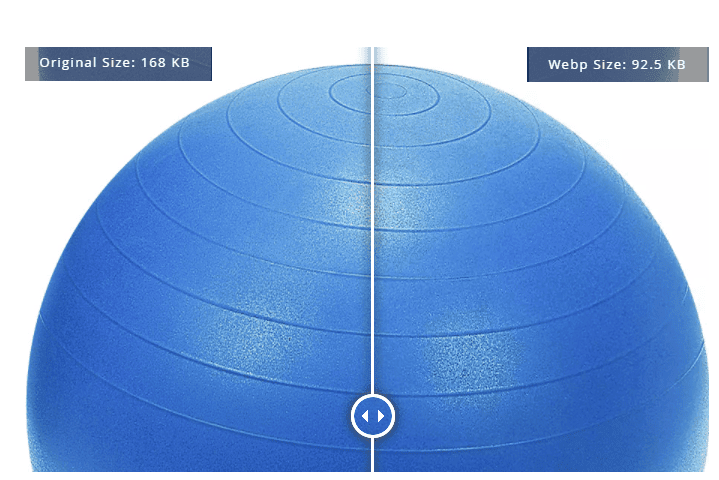
It is a modern image format developed by Google with the sole purpose of enhancing web performance. It supports lossless and lossy compression techniques, making it much superior compared to older image formats. Compared to PNG images, WebP lossless images are 26% smaller in size. Similarly, WebP lossy images are 25-34% smaller than JPEG. We don’t need to go into the details of how WebP images achieve this size reduction without sacrificing quality since it is too technical. Instead, let’s focus on how to implement them.
 How to implement WebP images with Magento 2
It is pertinent to mention that Magento does not have native support for WebP images. Therefore, there’s no other option but to implement them manually. There are three different ways to do so:
Online tools
The first option is to use an online tool to manually convert an image to WebP format. To do so, follow the below steps:
- Go to Google or any other search engine of your choice.
- Type ‘WebP Image Converter’.
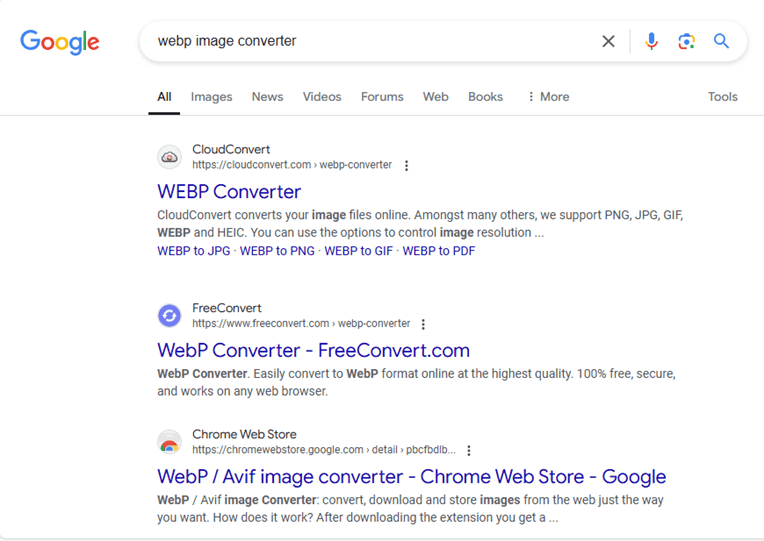 You’ll come across several websites that allow you to convert images to the WebP format.
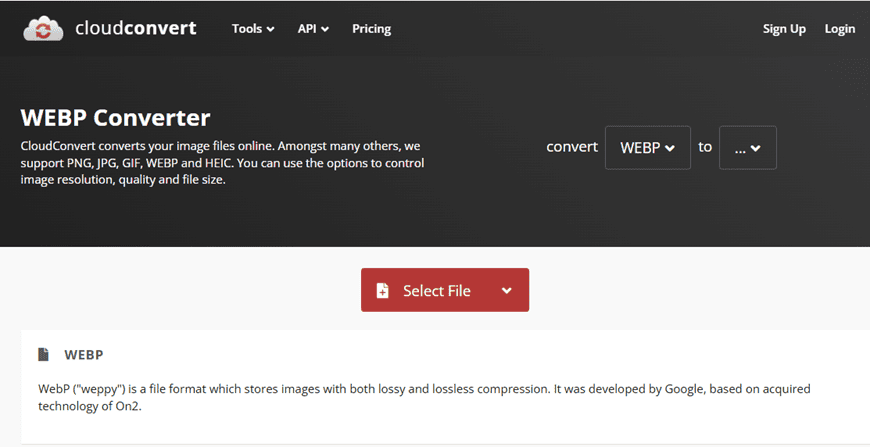
- We clicked on the first link. The online tool looks something like this:

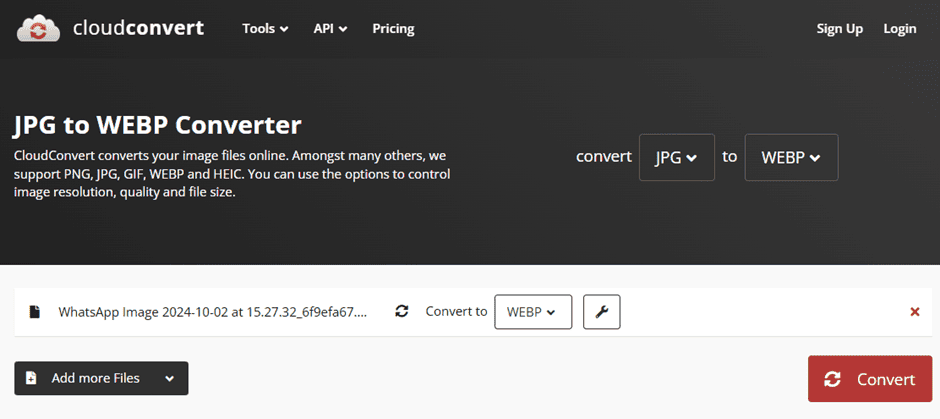
- Make sure to tweak the settings. You are not converting images from WebP to another format. Instead, you are converting it to WebP.
- We selected a random image for this purpose.
- Once the file is converted, download it.

As you can see from the above image, the WebP image is about 21% smaller than the JPEG version. When using online tools, make sure to understand the terms and conditions. The most important part is how they plan to use your uploaded files and how long they’ll retain it. Remember, online tools are not always safe or recommended, especially for confidential files.
Pros and cons of using online tools for implementing WebP images in Magento 2
Most online tools are free and quite convenient. All you need is an internet connection, upload the file, click on ‘Convert’, download the converted file, and that’s it. It’s very simple and straightforward. However, the problem is that online tools are not highly effective. While they do achieve size reductions, they may compromise on quality. This is not true for each tool but for most. Another drawback is that they don’t allow bulk conversions.
Suppose you have a small eCommerce store with about 50 products. For each product, you’ll have at least four images. Now, consider the images on blog pages, CMS pages, and the rest of the website. In short, you’ll have at least 300 images. Converting all these images using an online tool is a hassle. You may be allowed to upload only five images in one go, or there may be a free-use limit. So, online tools are ideal for fewer files but not for bulk conversions.
Redesign the images in WebP
The next option is to go back to the drawing board and redesign all the images in WebP format from scratch. While this would help achieve maximum file reductions, it can be extremely time-consuming and resource-intensive. The only thing that will make it easier is if you have the source file for each image. Otherwise, imagine how much time it will take to redesign 300 images. If you have a medium—to large-sized store, it will take even more time and resources.
Luckily, the latest versions of image editing tools, such as Adobe Photoshop, now offer native support for WebP. To save images in WebP in Adobe Photoshop, follow these instructions:
- Go to File à Save a Copy, or Click ‘Save As.’
- If you have selected ‘Save a Copy,’ select WebP using the ‘Format’ drop-down. Click on ‘Save’.
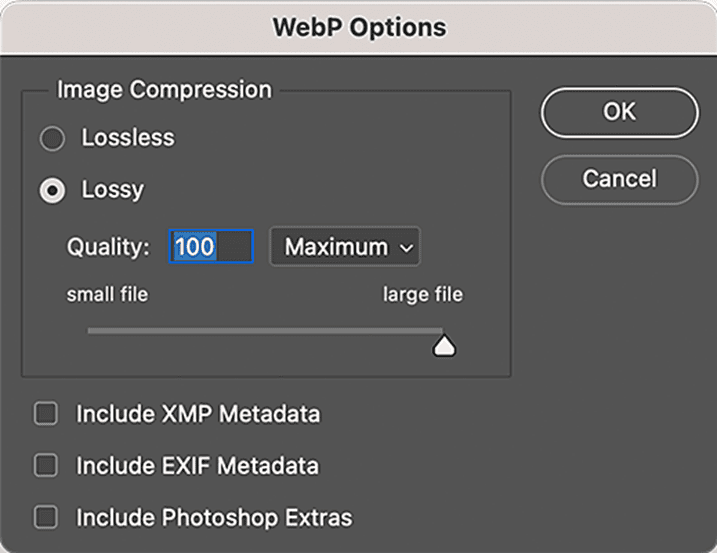
- Edit the below settings and click on ‘OK.’
Pros and cons of redesigning the images
The most significant benefit is that the store can realize a maximum reduction in file size. However, it will take considerable time since redesigning the images from scratch is not easy. If an agency handles content creation for your store, the whole redesigning process can be financially draining. If you plan on buying the software yourself, be prepared to be set back by several hundred dollars. Professional image editing and creation tools are quite expensive. They also have a very steep learning curve.
Use a Magento 2 WebP image extension
The third option used to implement WebP images with Magento 2 is using an extension. There are several extensions available for this purpose. We are not going to mention any specific extension. Nevertheless, we will list several must-have features that such extensions must have, thereby helping you decide which one is worth your money. Before doing so, let’s understand how an extension works.
After installing the extension, you have to configure it as per the instructions. Afterward, you can select which image folders to convert to WebP format. Once the folders are specified, the extension will automatically convert existing and new images in the folder to WebP. Now, let’s focus on what features these extensions must have to be considered a feasible choice.
Must have features in a Magento 2 WebP images extension
- Specify folders – There must be an option to specify folders for conversion purposes. Of course, there’s no point in converting every image to WebP. Therefore, it is imperative to have a feature that allows the admin to include or exclude folders from conversion. This ensures optimal resource utilization.
- Set quality level – In the Adobe Photoshop tool, there’s an option to determine the quality level. This is a must-have feature for a Magento 2 WebP image extension. You don’t always need to ensure 100% quality. It can sometimes be sacrificed to achieve greater file size reduction.
- Set size level – Similarly, there must be an option to set the file size level as well. Users should be able to specify which file size they require.
- Preview image quality – There’s no point in converting the images only to realize that the image quality is not what you expected it to be. Therefore, a top-rated extension must have the option to preview image quality before the conversion. This allows the user to tweak the settings to get the desired quality and then start the conversion process.
- Preview size – Similarly, there must be an option to preview the file size before conversion. There’s no point in implementing WebP images if the file size reduction is not up to mark. By previewing the file size, users can see if the selected settings are correct.
Pros and cons of using a Magento 2 WebP images extension
Pros
- The most notable benefit of using an extension is the ease of use. They are extremely easy to set up and use. You don’t need a dedicated team for this purpose, either. All you need to do is follow the user manual, and that’s it. If that’s not feasible, you can opt for paid installation, which is ideal for merchants with limited technical knowledge.
- Secondly, most extensions offer automatic conversion features. It means that all existing and new uploads are converted to WebP. This saves a great deal of time and effort.
- Thirdly, they contain fallback support. Remember that not all browsers support WebP. So, if a user comes to your website on an unsupported browser, the extension will automatically serve the image in a compatible format (e.g., JPEG or PNG).
- Fourth, these extensions offer additional features that further streamline the website’s performance. For example, it may offer lazy loading features that prevent the browser from loading the complete website, thereby boosting loading times and reducing data consumption.
- Fifth, these extensions enjoy regular updates. Therefore, expect exciting new features every now and then.
Cons
- The only cons that merit a mention is the price and maintenance. Some extensions can be quite expensive. But understand that it is a one-time investment and not a recurring payment. If the extension company fail to properly maintain the extension, i.e. issue regular updates or fix bugs, the extension can quickly become obsolete.
Why is it essential to implement WebP images?
Faster load times
As mentioned earlier, WebP images are quite smaller in size compared to JPEG and PNG Images. When you convert all images to the WebP format, your store’s loading times improve significantly. For example, if your store took around 6 seconds to load previously, the current loading time will be down to 4 seconds or even less. Faster loading times improve the user experience.
Higher search engine rankings
Google and all other search engines use a website’s loading times as an important factor in their search algorithm. Thus, the better the loading times, the higher the search engine rankings.
Improved conversions
When your store appears higher in the search engine rankings, it will lead to an increase in organic traffic. Suppose your store got 100 visitors before. Once your rankings improve, the number of visitors will increase. Eventually, it will have a positive impact on your conversions.
Reduced data consumption
Mobile users are often on limited data plans. Since most eCommerce traffic and sales come from mobile devices, it is important for store owners to optimize the experience for mobile users. By reducing the file size without compromising on quality, mobile users can enjoy higher-quality visuals without worrying about consuming too much data.
Reduced bounce rates
If a website takes too long to load, users will move to another website. This increases the website’s bounce rate. Thus, even if you have top-rated products and excellent customer service, customers will keep bouncing to competitors. By reducing the image file size, you can speed up loading times. Resultantly, this will lower your bounce rate. Most search engines use the bounce rate as a measure of website quality. A higher bounce rate indicates the website is spammy. Thus, the search engine may move it down the rankings.
Reduced server load
Reduced image size frees up valuable server resources, preventing the need to upgrade server storage capacity periodically.
Energy efficiency
Nowadays, environmental protection is a top priority for every individual and business. Reducing the image size decreases the demand for energy consumption. This is quite beneficial for the environment since most of the world still runs on non-renewable energy sources.
Wider support
Lastly, another benefit of using Magento 2 WebP Images is that they are gaining broader support. For example, the latest versions of image tools like Adobe Photoshop support WebP. Also, Chrome, Firefox, Safari, and almost every other browser now supports WebP.
Conclusion
This concludes our article on how to implement WebP Images in Magento 2. As the discussion shows, there are three different ways to do so. The first method involves using any online tool. While this method is relatively straightforward, the tools are not always accurate. Secondly, they may have a free-use limit. The second method involves using a professional image editing tool to redesign the images from scratch. Although quite effective, it can be time-consuming and financially draining. Thus, using an extension remains the most effective method. An extension automatically converts the selected images to WebP, thereby reducing any manual work. The article also listed ways to determine which extension is worth the money. Therefore, whenever buying an extension, look for the must-have features to help you avoid issues later.
Need marketing help to support business growth?
We welcome the opportunity to show you how we can make your marketing SIZZLE with our data-driven, results-oriented marketing strategies. Sign up for our FREE newsletter, get our FREE guide to creating an awesome website, or contact us for more information on hiring us.
Hausman and Associates, the publisher of MKT Maven, is a full-service marketing agency operating at the intersection of marketing and digital media. Check out our full range of services.
Discover more from MKT Maven
Subscribe to get the latest posts sent to your email.


